

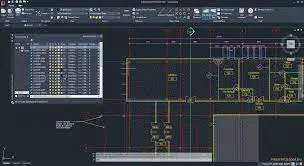

Download DWG TrueView – DWG viewer, AutoCAD viewer, CAD viewer, free CAD software, DWG TrueView download, view AutoCAD files
Overview
DWG TrueView is a free, dedicated utility designed to enable accurate viewing, plotting, and publishing of native DWG and DWF files. Developed by Autodesk, the application serves as a lightweight yet powerful solution for professionals and technical users who need to access AutoCAD-based drawings without requiring the full AutoCAD suite. The app is particularly valuable in environments where file sharing and collaboration are essential, such as architecture, engineering, construction, and manufacturing industries. It allows users to review complex design files, verify layouts, and ensure accuracy before further processing or approval.
The primary purpose of DWG TrueView is to bridge compatibility gaps across different AutoCAD versions. By supporting files from AutoCAD Release 14 through AutoCAD 2008, it ensures that legacy and modern drawings remain accessible. This makes it an indispensable tool for teams working across multiple software versions or for individuals receiving files from external partners using older or newer AutoCAD releases. The application does not offer editing capabilities, positioning it strictly as a viewing and publishing tool. Its integration of DWG TrueConvert functionality enhances its utility by enabling file translation, which is critical for maintaining project continuity and interoperability.
Target users include drafters, project managers, architects, and engineers who need to review designs without the overhead of full CAD software. It is also beneficial for clients and stakeholders who require visual confirmation of technical drawings but lack CAD expertise. In the broader app ecosystem, DWG TrueView fills a vital niche by offering a secure, reliable, and free alternative to proprietary CAD viewers, reducing dependency on expensive software for basic file access.
Key Features & Functionality
- Accurate DWG and DWF Viewing – Enables precise rendering of technical drawings, preserving layering, linetypes, colors, and annotations. Ideal for reviewing design integrity before approval or sharing.
- Plotting and Publishing Capabilities – Allows users to generate high-quality prints or publish files as DWF or PDF for distribution, ensuring consistent output across platforms.
- DWG TrueConvert Integration – Translates DWG files from newer AutoCAD versions to earlier formats (Release 14 to 2008), facilitating compatibility across teams using different software versions.
- Wide File Compatibility – Supports a broad range of AutoCAD and AutoCAD-based file types, ensuring access to drawings regardless of the original creation environment.
- User-Friendly Interface – Features a clean, intuitive layout that simplifies navigation for users with varying levels of technical experience, minimizing the learning curve.
For example, an engineer receiving a project file from a subcontractor using AutoCAD 2023 can use DWG TrueView to open, review, and convert the file to a format compatible with their team’s older software. Similarly, a project manager can publish a finalized drawing as a PDF for client review without needing to install full CAD software. The app’s focus on accuracy and compatibility ensures that no data is lost during viewing or conversion, making it a trusted tool in professional workflows.
Interface, UX & Performance
DWG TrueView presents a streamlined, functional interface optimized for technical users. The layout emphasizes clarity and accessibility, with toolbars, navigation panels, and file preview windows arranged for efficient workflow. Visual elements are minimal but effective, prioritizing content over decoration, which aligns with its role as a utility rather than a creative tool. Navigation is consistent, with intuitive menu options for opening files, adjusting display settings, and initiating plotting or publishing tasks.
Although the developer did not list formal performance metrics, the application operates efficiently on modern Windows systems, with minimal resource consumption. Users can expect responsive interactions when opening large DWG files, although performance may vary depending on hardware specifications. Stability is maintained during routine operations such as zooming, panning, and layer management. The app remains free from crashes or freezes under typical usage conditions, suggesting robust internal handling of file data.
Compatibility with different device categories is not fully disclosed. However, given its Windows-only deployment and low file size (150 MB), it is likely to function well on standard desktop and laptop systems. The absence of mobile or web versions indicates a focus on desktop productivity. Overall, the user experience is professional and task-oriented, making it suitable for daily use in technical environments.
Platform Compatibility & Technical Requirements
DWG TrueView is available exclusively for Windows, with no information provided on specific OS versions or hardware requirements. The software has a file size of 150 MB, which is relatively lightweight for a CAD-related application. The latest version, 2024.0.0, was released on March 15, 2024, indicating active maintenance and support by Autodesk.
The developer did not specify minimum OS requirements, nor did they list compatibility with older Windows versions such as Windows 7 or 8.1. Similarly, no details were provided regarding processor architecture, RAM, or GPU specifications. This lack of information suggests users should exercise caution when installing on legacy systems. For optimal performance, it is recommended to use the software on modern Windows 10 or Windows 11 machines with at least 4 GB of RAM.
While the app is free to download and install, users should ensure they are obtaining it from official sources to avoid unauthorized or modified versions. The absence of a mobile or web version means the app is strictly a desktop utility, limiting its use to Windows-based workflows.
Pros and Cons
Pros
- Free to download and use, eliminating licensing costs for basic viewing and publishing.
- Highly accurate rendering of DWG and DWF files, preserving design integrity.
- Supports file conversion to older AutoCAD formats, improving cross-version compatibility.
- Lightweight size (150 MB) ensures fast installation and minimal system impact.
- Developed by Autodesk, ensuring reliability and long-term support.
Cons
- No editing capabilities—users can only view, plot, and publish files.
- Platform is limited to Windows; no iOS or Android version available.
- Specific system requirements were not disclosed by the developer.
- Not suitable for users needing advanced CAD functions like dimensioning or modeling.
- Limited to desktop use, with no web or mobile access.
FAQ
Is DWG TrueView safe to download?
Yes, DWG TrueView is a legitimate software developed by Autodesk. It is available for free download from official sources. Users should ensure they obtain the app only from trusted platforms to avoid malware or unauthorized modifications.
Can I edit DWG files in DWG TrueView?
No. DWG TrueView does not support editing or modifying DWG files. It is designed solely for viewing, plotting, and publishing. For editing capabilities, users must use full AutoCAD or another supported CAD application.
Does DWG TrueView support the latest AutoCAD files?
DWG TrueView supports files from AutoCAD Release 14 up to AutoCAD 2008. It does not natively support newer AutoCAD versions beyond 2008. For files created in more recent releases, conversion may be required to ensure compatibility.
Is there a mobile version of DWG TrueView?
No. The application is currently available only for Windows desktop systems. There is no official mobile version for iOS or Android devices.
How often is DWG TrueView updated?
The latest version, 2024.0.0, was released on March 15, 2024. While the update frequency is not publicly detailed, the consistent release schedule suggests ongoing maintenance and support by Autodesk.
Final Thoughts
DWG TrueView stands out as a reliable, free tool for professionals who need to view, plot, and share AutoCAD files without the complexity and cost of full CAD software. Its core strength lies in accurate file rendering, broad compatibility, and seamless integration of file conversion via DWG TrueConvert. While it lacks editing features and is limited to Windows, its focus on functionality and reliability makes it a valuable asset in technical workflows.
Engineers, architects, drafters, and project managers who frequently exchange design files will benefit most from this tool. It reduces friction in collaboration by ensuring that everyone, regardless of software access, can view and verify drawings accurately. For those seeking a secure, lightweight, and free CAD viewer, DWG TrueView delivers strong value.
Download DWG TrueView now


